 Documentation
Spark Operator
The Spark Operator aims to make specifying and running Spark applications as easy and idiomatic as running other workloads on Kubernetes. We have deployed cluster-wide Spark Operator that defines kinds ScheduledSparkApplication and SparkApplication, full documentation on kinds’ structure is available here. The official and detailed user guide is available here.
Important Configuration
You have to set spec.driver.serviceAccount to default, otherwise your Spark application fails on permission issues.
The official Spark examples use hostPath as the volume source. This does not work in the cluster because host mounts are forbidden. Use configMap or persistentVolumeClaim instead (examples). For persistentVolumeClaim, create the PVC first.
Driver and executor pods must run with a security context. Set podSecurityContext and securityContext on spec.driver and spec.executor, as shown in the example below. This makes the pods run as user 1000, drop all capabilities, disable privilege escalation, and apply the RuntimeDefault seccomp profile.
Minimal Working Example
The following example works with our deployment. It submits a small PySpark job that shows a JSON string and keeps the driver running, so you can reach the Spark UI.
The Spark UI has no authentication. Anyone who knows the address can access it. This example keeps the driver running so you can reach the UI. Be careful to keep it there. You cannot control what the UI shows, and it can display sensitive data such as logs or job contents. Delete the application when you are done to stop exposing it.
apiVersion: v1
kind: ConfigMap
metadata:
  name: spark-example-app
data:
  app.py: |
    from pyspark.sql import SparkSession
    import time

    spark = SparkSession.builder.appName("spark-example").getOrCreate()

    jsonStrings = ['{"hello":"world"}']
    rdd = spark.sparkContext.parallelize(jsonStrings)
    df = spark.read.json(rdd)
    df.show()

    # to make it possible to access the UI, the driver
    # is kept alive with an endless loop at the end
    while True:
        time.sleep(1)

---
apiVersion: sparkoperator.k8s.io/v1beta2
kind: SparkApplication
metadata:
  name: spark-example

spec:
  type: Python
  mode: cluster
  image: apache/spark:4.1.3-python3
  imagePullPolicy: IfNotPresent

  mainApplicationFile: local:///app/app.py
  sparkVersion: 4.1.3

  sparkUIOptions:
    ingressTLS:
      - hosts:
          - spark-[namespace].dyn.cloud.e-infra.cz
        secretName: spark-ui-tls

  driver:
    javaOptions: "-Duser.home=/tmp"
    serviceAccount: default

    podSecurityContext:
      runAsNonRoot: true
      seccompProfile:
        type: RuntimeDefault

    securityContext:
      runAsUser: 1000
      runAsGroup: 1000
      allowPrivilegeEscalation: false
      capabilities:
        drop:
          - ALL

    volumeMounts:
      - name: spark-app
        mountPath: /app

  executor:
    javaOptions: "-Duser.home=/tmp"

    podSecurityContext:
      runAsNonRoot: true
      seccompProfile:
        type: RuntimeDefault
    securityContext:
      runAsUser: 1000
      runAsGroup: 1000
      allowPrivilegeEscalation: false
      capabilities:
        drop:
          - ALL

    volumeMounts:
      - name: spark-app
        mountPath: /app

  volumes:
    - name: spark-app
      configMap:
        name: spark-example-app
        items:
          - key: app.py
            path: app.py
Other Configuration
Spark UI
Spark UI is automatically created for your applications on HTTPS address
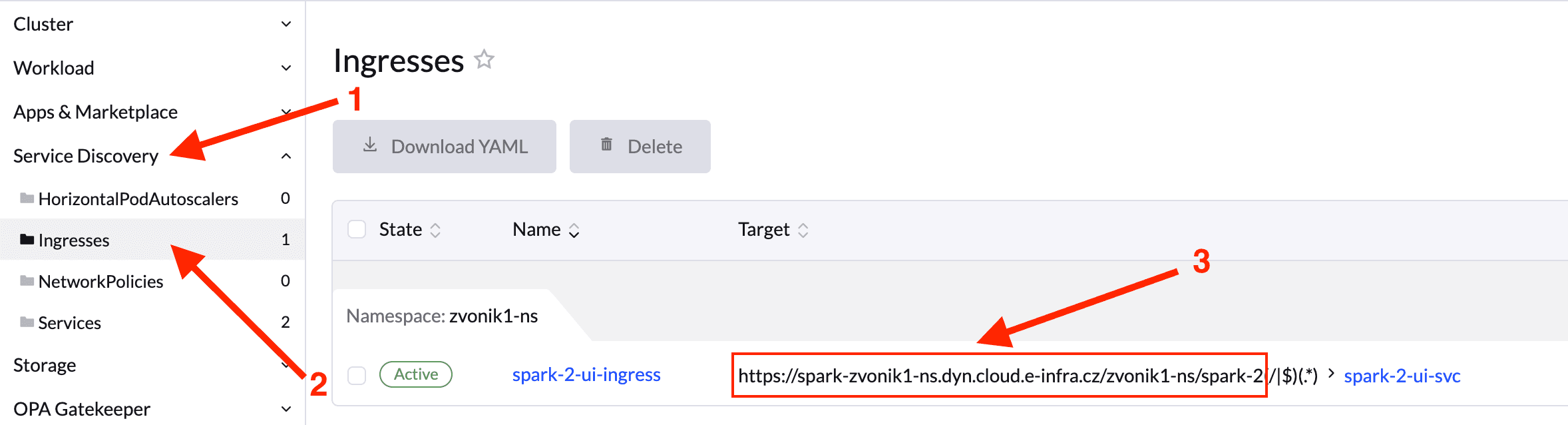
https://spark-[app_namespace].dyn.cloud.e-infra.cz/[app_namespace]/[app_name]and is also visible in Rancher UI, follow the steps to see its final form. When you copy the address into the browser, omit the last character group (/|$)(.*) (a Rancher related issue).
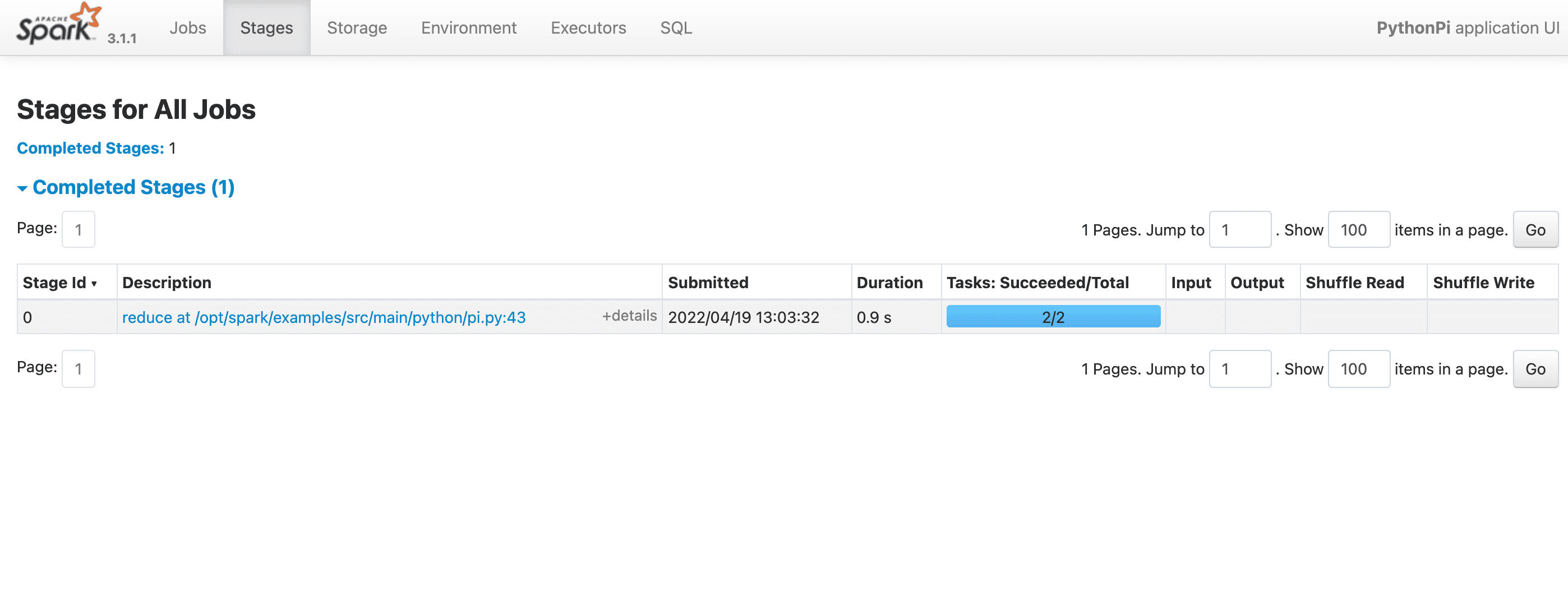
When you access the path, you should be presented with dashboard similar to
Custom SparkUI Ingress
If you want to provide custom annotations to Ingress (e.g. use different certificate issuer, we use letsencrypt) or custom TLS secret you have to include following code snippet in spark application YAML.
  sparkUIOptions:
    ingressAnnotations:
      [annotation_key]: [annotation_value]
      ...
    ingressTLS: (optional section)
      - secretName: [secretname_in_app_namespace]
        hosts:
          - [host]
We merge the items provided by you with our configuration. If you set the same annotation as we do, your value is propagated.